Overdrive Arena: Racing Anki Overdrive Cars From a PC After the App Went Away
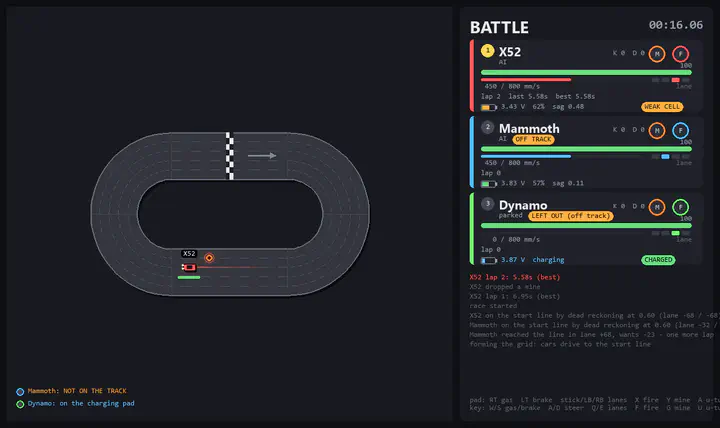
Anki Overdrive was a clever toy. The cars are small robots: a camera underneath reads optical codes printed on the track, so each car knows which piece it is on, how far along it is and which lane it is in. A phone app talked to them over Bluetooth LE, sent speed and lane commands, and layered a video game on top, with weapons, AI opponents and race modes. The track pieces snap together, so you can build your own circuit.
Anki shut down in 2019, and the official app is no longer available. The cars themselves are fine. They charge, they drive, they still read the track. Everything that made them a game lived in the app, and the app is gone.
This is the same story as my Neato vacuum: the hardware outlasts the company, and the company takes the brains with it. So I did the same thing. Overdrive Arena is a Python application that talks to the cars directly, from a Windows PC, with Xbox or PS5 controllers or the keyboard. It is open source under the MIT license, and the protocol notes are in the README for anyone who wants to build something else on top.
What it does
The short version: plug in some controllers, turn on the cars, and play.
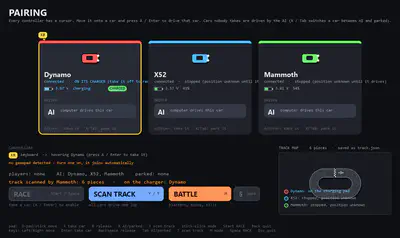
- One input device per car. Any gamepad SDL recognizes works (Xbox, DualSense, Switch Pro), plus the keyboard. Devices can be plugged in or removed while the app is running.
- Track scanning. The cars drive one lap and the app rebuilds the circuit from the codes they read: piece IDs, curve direction, and a check that the loop actually closes. The layout is saved to
track.jsonso you only scan once per track. - A live map. Cars are drawn on the scanned track with heading, lane, trails and effects, from the position reports the cars send plus dead reckoning between reports.
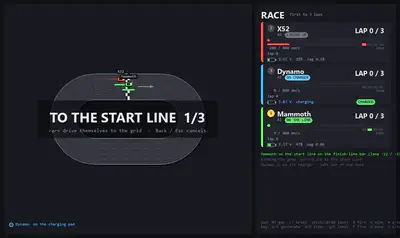
- A starting grid. Each car drives itself to the start line in its assigned lane and stops on the finish-line marker. Then a 3-2-1-GO countdown releases everyone at once.
- Two game modes. BATTLE has blasters, mines, health points and kills. RACE is first to N laps.
- AI drivers for the cars nobody claimed.
- Battery monitoring, because these cells are old, with voltage, an estimated percentage, sag under load, and a CSV log.
- Reconnection when a car reboots, which happens more than you would like with tired batteries.
Talking to the cars
The cars expose a single BLE service with a write characteristic and a notify characteristic. Messages are [len][id][payload], and the original message definitions come from Anki’s own drive-sdk, which they published back when the company existed. What the SDK does not give you is the behaviour around those messages, and that is where most of the work went. A few things I had to learn on real hardware, verified on firmware 11866 with the X52, Mammoth and Dynamo cars:
- Two messages on connect, not one. You have to send the SDK-mode command and also tell the car that its offset from the road centre is zero. Skip the second one and the car reports an offset of 654321, which means “undefined”, and every lane change you ask for is silently ignored.
- The cars do not correct their own lane estimate. A car believes whatever lateral offset it was last told, even when the codes it reads say otherwise. So before any lane change, the app reads the real lane out of the location ID and writes it back to the car. Otherwise “move one lane left” from a wrong belief lands you in the wrong place, or off the track.
- Curve direction comes from the wheels. The transition message sent when a car leaves a piece includes how far each wheel travelled on that piece. Left wheel further than right means a right-hand curve. That is how the scanner knows which way each curve turns.
- The codes stop reading below about 250 mm/s. The bars between pieces still register at a crawl, but the location codes do not. This matters for the starting grid, where the cars need to creep up to the line and still know where they are.
- The status message tells you whether the car is on the track, on its charger, low on battery or fully charged, and the first byte of the advertised name also carries the on-charger flag. Useful for excluding a car that is sitting on its pad from the race without anyone having to say so.
The location table that maps each code to a lane and a progress slot comes from Anki-Partydrive, another community project keeping these cars alive, along with the layout of the status message. The rest of the byte layouts were confirmed by recording laps and looking at what came back.
One Windows-specific trap worth writing down: bleak breaks when it runs on the main thread next to pygame, because of the COM apartment pygame sets up. All the BLE work runs on its own thread with a worker in between.
Scanning the track
Anki’s track is a 560 mm grid. A straight is 560 mm long, and a curve’s centreline radius works out to roughly 280 mm from the wheel-travel numbers, so four curves make a circle exactly one straight wide. Every piece has an ID (straights, curves, the two halves of the start piece with the finish-line bar between them, intersections, jump ramps and landings), and those IDs repeat within a layout, so you cannot identify a piece by ID alone.
Scanning works like this. Every connected car drives one lap. The app records the sequence of pieces each car crosses, with the curve direction from the wheel travel, and the first car to get back to a piece sequence that closes wins: its lap becomes the map. A car that reads nothing for eight seconds is flagged as not on the track. The result is a list of pieces with orientations that the renderer lays out on the grid, and it is saved so you do not have to do it again until you rebuild the circuit.
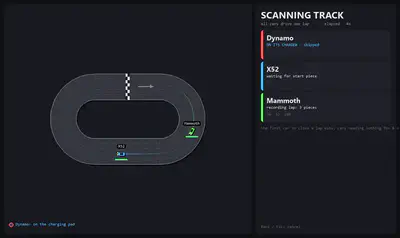
Once the map exists, each car has its own localizer: position reports snap it to a lane and progress slot on a known piece, and between reports the app extrapolates from the last known speed. That is what makes the trails on the map smooth rather than a series of jumps.
The starting grid
Each car taking part drives itself to the start line in its own lane. If it is facing the wrong way it U-turns first. For the last half piece it slows to 200 mm/s, just above the speed where codes stop reading, and stops on the finish-line marker.
If a car arrives in the wrong lane, it does another lap and tries again. A car that reads no codes for twelve seconds, or that is sitting on its charger, is left out. When everyone is on the line, the countdown runs and all cars are released at the same instant.
Battle and race
In BATTLE mode every car has 100 HP. The blaster fires at the nearest car ahead of you within 1.4 metres along the track, in any lane, for 20 damage and a slowdown to 45% speed for a second and a half, with a one-second cooldown. Mines drop in your own lane, arm after a second, and live for 45 seconds; a car passing within 12 cm in that lane takes 35 damage and stops dead for 1.2 seconds. You can have two mines out at once. At 0 HP the car stops for three seconds with its lights flashing, then respawns, and the kill goes on the board. Hits flash the car’s lights and rumble the controller.
In RACE mode the weapons are off. Each card shows LAP n / target with a progress bar, the ranking is by laps and then by position on the track, and the first car to the target gets a WINS banner while the others coast to a stop. Laps can be 3, 5, 10 or 20.
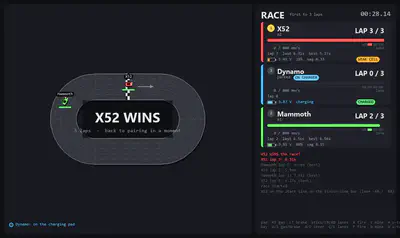
Cars nobody claimed are driven by the AI, which keeps them going the right way round at a cruising speed you can set. So one person and one controller still gets a race.
Old batteries
These cars are years old, and their single-cell LiPo batteries show it. The app polls each car’s voltage every four seconds and shows it on the card along with an estimated percentage from a resting-voltage curve. The more useful number is the sag: the difference between the idle voltage and the voltage under load. A sag above 0.20 V means a tired cell, and the card says so with a WEAK CELL tag. That is the car most likely to reboot when you accelerate hard, which is why the default acceleration is deliberately conservative. On the charger the card goes from CHARGING to CHARGED. Everything is logged to battery_log.csv, so you can watch a cell decline over a few sessions.
When a car does reboot, the card shows LINK LOST and the app reconnects to it automatically when it comes back.
Practical notes
Two things to know before you try it.
Bluetooth contention. The cars and any wireless controllers share the PC’s single Bluetooth adapter. Two Bluetooth Xbox pads on top of the car connections can make the car links less reliable. Plug the controllers in over USB or use an Xbox wireless dongle, or give the cars their own BLE adapter.
Lane changes are advisory. The car only knows the lateral offset it was told, as described above. The app re-syncs the offset from the codes before each lane command and retries lane changes that did not happen, but a car below 250 mm/s cannot read codes, so lane commands at a crawl are unreliable by nature.
Running it
Windows 10 or 11 with a Bluetooth LE adapter and Python 3.11 or later:
git clone https://github.com/Leicas/overdrive-arena.git
cd overdrive-arena
python -m venv .venv
.venv\Scripts\python -m pip install -r requirements.txt
.venv\Scripts\python app.py
Turn the cars on before launching. Every car that is advertising connects automatically, and you can restrict that with --max-cars or by address. The repository also has the small command-line tools I used while working out the protocol (scan, drive, lane and light tests, lap logging) and a recorded lap with an offline replay script, which is how the renderer can be worked on without three cars on the floor.
Links and credit
- Source: Leicas/overdrive-arena, MIT licensed. The README has the full protocol notes: message layouts, piece IDs, advertising format.
- anki/drive-sdk, Anki’s original SDK, for the message definitions.
- MasterAirscrachDev/Anki-Partydrive for the location-ID table and the status message layout.
- And the people who kept documenting these cars after the company stopped.
Anki and Overdrive are trademarks of their owners; this is an unaffiliated hobby project. If you have a box of these cars somewhere and a Windows PC with Bluetooth, they still race.

Antoine Weill--Duflos
Head of Technology and Applications
My research interests include haptic, mechatronics, micro-robotic and hci.